Showing posts with label Digital Literacy. Show all posts

Monday, August 15, 2016

The Blogging Cookbook for College ESL Teachers

Download your copy of The Blogging Cookbook for College ESL Teachers by Nicholas Walker and Helen Hefter.

Learn HTML while Blogging

The Blogging Cookbook for College ESL Teachers is intended to be self-explanatory. By following the directions, you will be able to create a web-log website (blog) that could prove useful and profitable to you. The examples are all relevant to ESL/EFL and will generate traffic, which will attract readers, advertisers and revenue to your blog. The principle goal of this cookbook, however, is to provide you with the confidence and momentum you’ll need to continue blogging and learning HTML, a basic web-programming language used extensively on the internet.


In this book, you will find the steps to follow to produce a 13-post blog of your own. The first three sections will simply introduce you to a free blogging platform called Blogger.com. Blogger is a Google property. It is free and easy to use. After a year of blogging, Blogger will offer to integrate AdSense advertisements into your blog, which will allow you to start making money from ads. (Remember that ads pay for content, so if you see an ad that interests you on someone else’s blog, click it. It will send the blog writer a small commission.) College students are usually chronically hard-up, so the fact that blogs can generate income is something worth mentioning to students. The next section is merely an illustration of the common HTML tags. The remaining sections will provide you with a number of adaptable mini-projects to include in your blog. Finally, the last section lists some resources that will help you learn more about HTML and blogging with students. 

All of the mini-projects in this cookbook use HTML rather than the what-you-see-is-what-you-get (WYSIWYG) compose-mode of Blogger. The reason for this choice is to provide you with HTML resources that you can use elsewhere, like Wordpress, Moodle, email, or any website that allows you to use HTML code. Also, I have found that simply by looking at HTML code you can learn a fair bit of HTML programming without having to take a course or rely on programmers. Basic HTML is pretty obvious: <b> means bold, <i> means italics, <strike> means strikethrough, <br> means break, etc. Take the time to look at the tags. You will get the hang of it very quickly.

Yours to Share and Adapt in Accordance with Sharealike 2.5

Remember that you are free to share the code, text, and images in this Blogging Cookbook for College ESL Teachers with your students and colleagues. You are also free to reuse and adapt any part of this document provided that you credit us, the original authors, Nicholas Walker and Helen Hefter. We also ask (but cannot insist) that you retain the links in the various mini-projects to our websites: VirtualWritingTutor.com, FieldRelated.com, BokomaruPublications.com, and Actively-Engaged-Online.blogspot.com. These links send a weak signal to Google and Bing to rank our websites a little higher in their search results. That helps us get our message out about our projects.

You can add your name as co-author to your adapted or expanded version of this document and even charge money for it, but you must retain the Sharealike 2.5 license on derivations. For example, you may want to add instructions for creating an account on Wordpress.com or Tumblr.com. Please do. Just add your name under our names on the first page. Remember that you can change the cookbook and pass it on, but you cannot prevent others from further adapting and expanding this document, too. Sound fair?

In any case, we hope you find The Blogging Cookbook for College ESL Teachers useful to you and your students.

Nicholas Walker and Helen Hefter
August 15, 2016

Friday, August 12, 2016

How to use your own web address for your blog

Instead of having a blog with a URL like Actively-Engaged-Online.Blogspot.com, imagine having your own domain name of your own invention with a .com or other extension. It is easy and affordable.


Change this: yourblog.Blogspot.com

To this: www.YourWebsite.com

Step 1: Navigate to Hover 

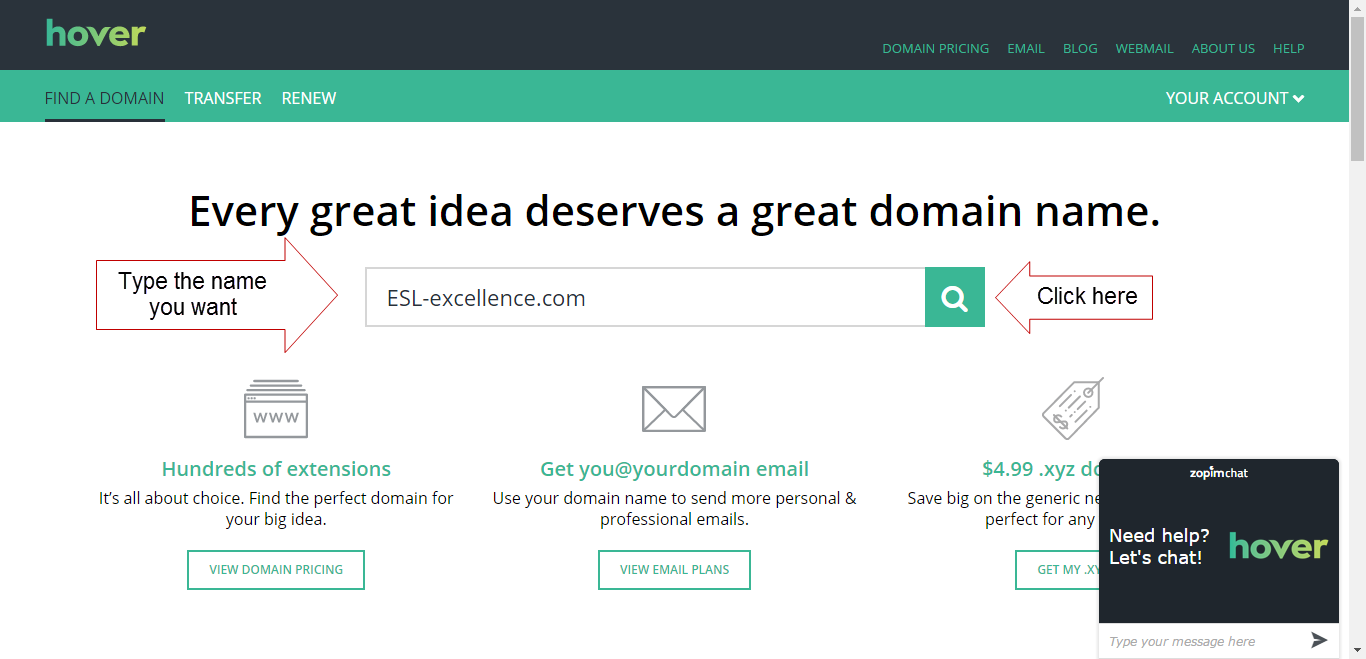
Hover is a domain registrar that can find and register domain names with a variety of extensions. 


 Step 2: Think of a Domain Name you would Like

Simply, type in a domain name you might like for yourself, and click search, like this. For example, I would like people to find my blog by typing in "www.ESL-excellence.com" so I typed in "ESL-excellence.com" and clicked the search icon.


Step 3: Register the Domain Name

I was lucky and the domain name I wanted was available. To buy it, all I have to do is click on the plus sign and pay.


Step 4: Link the Domain Name to Your Blog

After buying your domain name, the next step is to make it point to your Blogger blog. Navigate to your blogger account and click on your blog. Then, click on settings. 


Step 5: Navigate to Settings

After buying your domain name, the next step is to make it point to your Blogger blog. Navigate to your blogger account and click on your blog. Then, click on settings. 

Step 6: Enter Your New Domain Name

Now, simply enter your domain name into the field on Blogger, and click save.


Step 7: Enter Blogger's Details on Hover

Blogger will give you CNAME and other details associated with your blog. Copy the information exactly into the appropriate fields on Hover. Hover has people who can help you with this step if you get stuck. It's not as difficult as you might think. Once your info has been entered, your readers will be able to navigate to your blog using your www address.


Thursday, August 11, 2016

Free ESL Grammar Checker


The Virtual Writing Tutor is the best online grammar checker for ESL learners.
Find out how you can add digital literacy training to your CEGEP ESL course with Bokomaru Publications.

MP3 Voice Recorder


Powered by Vocaroo Voice Recorder

Monday, May 2, 2016

Hypertext Narratives Arranged by Field of Study

French speaking students here in Quebec are required to take two English courses at junior college (CEGEP). The first is a general, competency-based course matched to their proficiency-level. We have four proficiency levels, which I call false-beginner, low-intermediate, high-intermediate, and advanced. The second English course at the same proficiency level is intended to build on the first course by having the students read, write, listen and speak with a link to their fields of study. To that end, I have been asking my low-intermediates to write listicles, glossaries, new-top summaries,  and hypertext narratives. I also ask them to create a YouTube walkthrough of a field-related website and a walkthrough of  their own hypertext narratives. The tasks and supporting readings and listenings can be found in Actively Engaged Online (Walker, 2015). If you are interested in using any of these tasks with your students, leave a comment and I will be happy to share some resources with you.


Hypertext Narratives for College ESL Digital Literacy

A hypertext narrative is a cross between a computer game and a story. The reader is invited to make choices that influence the outcome of the story. I provided learners with a template, and they filled in the blanks. Some decided to simplify the structure of the story and write longer passages. In every case, there should be a story and hyperlinks that lead to different outcomes.

Some of my colleagues view the learning needs of their students as being similar to their own first language learning needs 20 or more years ago. In my view, not only are the needs of second language learners strikingly different from their first language counterparts, but the need for digital literacy and lifelong learning strategies must be integrated into all four skills. If they don't learn digital literacy from us, who is going to teach them? Their 17th Century French Literature teachers? Their Philosophy teachers?

English is the language of the internet, and teaching students how to write and speak online will provide learners with a chance to continue developing their English skills beyond the confines of our courses. To that end, I ask students to create Blogger and Youtube accounts, and use the VirtualWritingTutor.com and FieldRelated.com to help them get feedback on their errors and vocabulary.

Examples of Hypertext Narratives Arranged by Field of Study

Here are a few examples of hypertext narratives written by students. I asked them to work cooperatively to share ideas and help each other integrate workplace and field related vocabulary into at least one branch of their stories. The links to the stories are organized below by field of study. I created 3D book covers to make navigating the various fields of study easier. Leave a comment, share, or like this blog post if the mood takes you.


Paralegal Technology cover


Prehospital Emergency Care cover

Psychology cover


Youth and Adult Correctional Intervention cover

Sunday, January 24, 2016

51 Listicles by Field of Study

Listicles for College-Level ESL

The word "listicle" is a combination of the words "list" and "article." You have seen them before. They pop up all over the internet with titles like "5 Best" or "10 Top Reasons" or even "100 Ways to..." Each listicle is a blogpost organized around a prioritized list and is essentially a series of paragraphs where the heading declares both the topic of the paragraph and its rank in a prioritized list. As such, listicles attempt to persuade the reader to do something or accept an opinion based on a list of justifications.

Below is a list of listicles arranged by field of study. These blog posts were written by my students at Ahuntsic College in the context of their 101 B-block course in September, 2015. The goal of the assignment was to provide a number of reasons to choose a particular field of study. As their first writing assignment, they represent each student's first foray into blog writing.


The Listicle Assignment

As part of an effort to promote digital literacy, I required a number of features that are common to listicle blog posts. I asked that they add an image related to their field with the appropriate attribution, so I recommended that they search Wikimedia Commons, a repository of share-with-attribution and public domain images.  I also asked for headings, a minimum of 350+ words, and the elimination of all errors using an online ESL grammar checker. Though the grammar checker system did not catch all of their errors, my intention was to train them to use a revision strategy that would serve them in the future when they no longer had access to an ESL teacher to proofread their writing. Finally, to promote group cohesion and productivity, I gave a point for having received a comment on their blog post. To get the point, they had to find someone to read their articles.

The Listicle Evaluation

Evaluations were easy to do. Students did two anonymous peer evaluations of classmates' listicles after submitting a link to their own listicle using a Moodle plugin on Labodanglais.com. To ensure the reliability of the peer assessment, I used an illustrated checklist--the same checklist I used when I did my evaluation. I find that using binary assessment criteria ensures that the number of requests to explain scores and feedback is zero. See below for a screenshot of part of the checklist I used.


Reflection

Considering that so many of my students are not headed directly to university, the academic essay did not seem to be the best choice of writing assignment for this student population. The listicle, however, has qualities that can serve both academic and non-academic stream students. It is structured, persuasive, and requires paragraphing and revision strategies. In this way, it allowed the students to work toward the 101 b-block writing competency while exploring and reinforcing their own motivation for their choice of program.

More importantly, the task is authentic. This type of blog post is a common discourse model in the blogosphere. Learning to do it will help learners develop their own content marketing strategies that should serve them in business and further education.  The conversational tone of the listicle supports speaking fluency, making it a worthwhile writing task for a course with the stated goal of "a degree of fluency" since overemphasizing formal registers has been found to reduce integrativeness in second language learners.

There are other reasons why students should write blogs in their Cegep ESL courses, but if you are already convinced, there is a textbook for blogging in Cegep 101B or 102B that you can try.

Accounting and Management Technology

By Chisholm, Hugh, ed.
(Encyclopædia Britannica 1911)
[Public domain], via Wikimedia Commons
  1. Listicle
  2. Listicle
  3. Listicle
  4. Listicle
  5. Listicle
  6. Listicle
  7. Listicle
  8. Listicle
  9. Listicle
  10. Listicle

Business

Joe Mabel [GFDL 
(http://www.gnu.org/copyleft/fdl.html)
or CC-BY-SA-3.0
(http://creativecommons.org/
licenses/by-sa/3.0/)],
via Wikimedia Commons
    1. Listicle
    2. Listicle
    3. Listicle
    4. Listicle
    5. Listicle

    Communication

    Dental Hygiene


    Diagnostic Imaging

    By liz west from Boxborough, MA
    (CAT scan Uploaded by Jacopo Werther)
    [CC BY 2.0 (http://creativecommons.org/
    licenses/by/2.0)],
    via Wikimedia Commons
    1. Listicle
    2. Listicle
    3. Listicle
    4. Listicle

    Electrophysiology

    Finance

    Health Science

    Journalism

    Medical Records Management

    1. Listicle
    2. Listicle

    Paralegal Technology

    By Peregrine981
    (Own work) [Public domain], 
    via Wikimedia Commons
    1. Listicle
    2. Listicle
    3. Listicle

    Physical Education


    Police Technology

    By SPBer (Own work)
    [CC BY-SA 3.0
    (http://creativecommons.org/
    licenses/by-sa/3.0)],
    via Wikimedia Commons
    1. Listicle
    2. Listicle
    3. Listicle
    4. Listicle
    5. Listicle
    6. Listicle
    7. Listicle
    8. Listicle
    9. Listicle
    10. Listicle


    Prehospital Emergency Care

    By Mtlfiredude (Own work)
    [CC BY-SA 3.0
    (http://creativecommons.org/licenses/by-sa/3.0)],
    via Wikimedia Commons

    Psychology

    1. Listicle
    2. Listicle
    3. Listicle

    Radiation Oncology

    Social Science

    1. Listicle
    2. Listicle
    3. Listicle

    Video Game Design

    Youth and Correctional Intervention


      Wednesday, December 30, 2015

      Hypertext Narrative Walkthroughs by Program

      Introduction

      Hypertext narratives are fun to read. They invite the reader to make choices at key moments in the story that affect its direction and change the outcome for the protagonist. For the reader, this added interactivity gives the story a game-like feel that makes you want to read it again to see what would have happened if you had chosen a different path. For the author, the hypertext narrative unleashes new avenues of creativity and hypothesis-testing in the narrative mode. It situates thinking in the context of a life, and asks the all important question, "What if..?"

      Hypertext Narratives for ESL

      In language learning, the hypertext narrative holds a special promise. Not only does it afford interesting opportunities for learners to develop their digital literacy skills, skills that will prove more and more valuable as technology elbows its way into every field and profession. The hypertext narrative also situates meaningful language use. If language is best learned through the exchange of meaningful messages in a meaningful context--because situated, meaningful language practice facilitates the recall of target structures when those situations are encountered again in real life--the hypertext narrative provides an effective way for learners to visit a range of situations using their imaginations that would be difficult otherwise to simulate in the classroom. 

      Talking about these hypertext narrative projects by asking and answering questions helps the learners link what they have written with speaking, and it gives learners practice talking about their work, a skill worth developing in future job interview and academic contexts. Recording the talk as a YouTube video is has become a popular and authentic way of communicating with the world beyond the walls of the classroom these days. Indeed, video recording a message affords additional opportunities to reflect on aspects of one's own performance and try again in ways that face-to-face interaction does not provide nearly so well. Since the learner has a choice to turn the camera on herself or on the screen, self-conscious students can focus as much or as little as they wish on how they look to others. 

      For teachers concerned that learners should develop their moral and ethical thinking, what better way than to invite students to use their imaginations and visit the various consequences of a range of life choices and their alternatives to see how they might play out? Consider how a pedagogical essay asks the learner to take a position and defend it, or a debate explores the "for" and "against" of moral choice. A hypertext narrative goes further by inviting the author to consider the chain-reactions caused by choices and how so quickly we can be swept away by their consequences. 

      About these Hypertext Narrative Walkthroughs

      Whatever their pedagogical value, my students enjoyed flexing their creative muscles by thinking up moral challenges for their protagonists. See for yourself. Here is a gang of new hypertext authors talking about their hypertext narratives. You will have to listen carefully for the URL if you want to visit their blogs and read their hypertext narratives for yourself. 

      I have arranged the various walkthroughs by program and field of study. You can search for a particular field-of-study using Ctrl + F on your keyboard, or you can scroll down alphabetically. The ones that deserve special attention are marked with an asterisk. Find them quickly by typing Ctrl + F and *.  

      Please, leave a comment at the bottom of this page to share your thoughts on this new form of college-level writing. I can attest that it worked for me. If you want to try it with your students, leave a comment or order an evaluation copy of Actively Engaged at Online from Bokomaru Publications.

      College Programs and Fields of Study

      Accounting and Management Technology


      Health Sciences

      Medical Electrophysiology

      Medical Records Technology


      Police Technology

      Social Science

      Commerce

      Education


      Sport Studies


      Paralegal Technology

      Psychology


      Friday, December 11, 2015

      How to Create a Blog on Blogger: Getting Started

      How to Create a Blog on Blogger

      Step 1

      The first step to creating your own blog for language learning is to go to Blogger.com. You will need to create an account if you don't have a Gmail account already. It is easy and takes seconds. 

      Step 2

      The next step is a little more complicated. You will need to create a title and address for your blog. The title should be related to your field of study or the thing that you expect to be writing about most. If you are not sure what topic you want to blog about, consider creating a title and address related to your name. If your name is "Helen," name your blog Helen's Blog (title) at helens-blog.blogspot.com (address). You will also have to choose a template. Choose something simple because this part is easy to change later. 

      Step 3

      Once you have created your blog title and address, click "New post" under the word "My blogs" on the left. If your blog is in another language you can change the language setting here by clicking the "cog" icon in the top right.


      Step 4

      When you click "New post" you will see a blank page. Give your blog post a title, like "About Me" and write something about who you are and what you do.  Click "Save" and "Publish" on the right and click "View blog" on the left. Now, you are a blogger. 

      Step 5

      You can leave your first blog post as it is, but serious writers look for feedback on their writing. Copy your first blog post and paste it into the VirtualWritingTutor.com and click "Check grammar" to see if it can detect any errors. If there are errors in your text, the VirtualWritingTutor will show you how to correct them.   


      Step 6

      Simply edit your post, make the necessary corrections, and click "Update." Now, you are ready to promote your blog. Why not join us a https://www.facebook.com/groups/learn.English.by.blogging and share your first blog post. The other members of this group would love to meet you and help you improve your writing. 


      Sunday, December 6, 2015

      Facebook Group to Learn English by Blogging

      Nicholas Walker
      So, you want to learn English.  That's great! Maybe, you want to improve ability to communicate in your field, or maybe you want to improve your chances of finding a job. I want to help you.

      My name is Nicholas Walker. I teach college English as a Second Language in Montreal, Canada, and I develop websites related to ESL in my spare time. Not only do I have many years of experience teaching English in South Korea and Canada, I also have an M.A. in Applied Linguistics and a B.A. in English Literature. I know English, and I know how to teach it.

      I want to help you improve your English, but you have to help me.

      Here's how:

      1. Be active. 

      I want to work with people who are serious about improving their English. You can demonstrate that you are serious about learning English in the following ways.
      • Join my Facebook group: Learn English by Blogging. This is where we exchange links and advice to help each other. Promote your blog to other group members here.
      • Visit the group page every week, liking and responding to the activity there.
      • Arrange for video and audio chat conversations with other group members. 
      • Do the exercises and blog writing assignments. Don't stop.  
      • Create a blog on Blogger.com related to your field of study or passion. Make sure that your blog address and title contain words related to your field of study or interest. 

      2. Help the other group members. 

      There are a number of ways that you can be helpful to the other members of the  Learn English by Blogging Facebook group. Some ways are easy. Some take an extra effort. 
      • Easy: start by being supportive. Everyone likes to hear encouraging remarks about their efforts to learn and express themselves. Click the like button when someone shares a link to a blog post they have written. 
      • More difficult: write helpful comments. If you see a problem with someone's blog post, write a three part comment. 1) Thank that person for sharing. Say, "Thanks for sharing your blog post." 2) Tell the group member how to improve his or her blogpost with specific advice. For example, you could say, "You should write shorter paragraphs." 3) End with a specific positive comment, "I really like your title. Very catchy." Comments like these help writers feel good about the help they receive from others. 

      3. Help the teacher.

      You want to learn English. I want to promote my websites. In return for the opportunity to improve your English, I would like your help. Copy and paste the following links into your blog posts:

      References

      4. Write blog posts

      Create a blog on Blogger, and start writing blog posts with titles, images, text, and links. Here are some blog post writing assignments I recommend:
      1. Introduction: write a paragraph about yourself and a paragraph about your professional goals for your blog. Explain why you are writing a blog and how you think it will help you.
      2. Listicle: write a numbered list of items related to a theme. Click here to see an example of a listicle. Make sure to include an introductory paragraph (no heading) and 3 or more paragraphs with numbered headings.
      3. Walkthrough: record yourself on YouTube giving a guided tour of a website related to your field of study or passion. Show your listener how to achieve a specific goal.  Embed your video on your blog with a short introductory paragraph. 
      4. Summary: write a summary of an article related to your field of study or passion. Do not copy and paste. Say why you chose the article and how it relates to your field. Add a link to the original article. 
      5. Glossary: Make a list of some technical or semi-technical terms related to your field of study or passion. Go to FieldRelated.com for examples. Do not copy paste a glossary entries. Make your own. Use Google and do a search using the the search term define + the word you wish to define. 
      Once you have written each of these blog posts, share your link on the  Learn English by Blogging Facebook group. We will give you the encouragement and support you need to keep learning. 

      Tuesday, October 6, 2015

      Field of Study Glossaries as an Authentic Blog Post Type


      People often need to look up unfamiliar words, and so one common type of blog post that people search for is the field-related glossary. For college students, compiling a list of field-specific words can be a useful way to become more familiar with technical and semi-technical words in their fields of study. The field-specific glossary is therefore both an authentic and pedagogically useful writing model for college ESL students to learn. Each field of study comes with its own specialized vocabulary or with common vocabulary used in a specialized way. Consider how a "jab" in boxing a semi-technical name for "a short, straight punch," but in nursing a "jab" refers to "an injection with a needle."

      Glossaries usually come with a short explanatory paragraph and then employ <dl></dl> tags to contain the definition list, <dt></dt> tags to contain the term being defined, and <dd></dd> tags to contain the definition.  Below is the form a glossary blog post usually takes without any content. Make your own glossary with a title, short introduction, a heading and a list of words.

      Glossary Heading

      term 1
      definition 1
      term 2
      definition 2
      term 3
      definition 3
      term 4
      definition 4
      term 5
      definition 5
      term 6
      definition 6
      term 7
      definition 7
      term 8
      definition 8
      term 9
      definition 9
      term 10
      definition 10
      For more words related to this field or study, or to analyze any text for program-related or field-related vocabulary go to FieldRelated.com.

      Analyze your text for field-related vocabulary with FieldRelated.com

      Wednesday, September 2, 2015

      Five Content Marketing Strategies for ESL Students

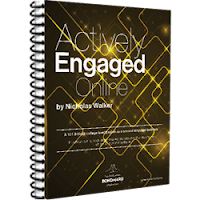
      Actively Engaged Online book icon showing the cover and spiral binding
      Digital literacy for ESL 

      There is a new way to market products to consumers and get the attention of potential employers. It is called content marketing. The way it works is this: you publish articles (content) on a blog, and people looking for information using a search engine will find you and learn to like, trust and respect you (marketing) through your writing. Specifically, you’ll need to publish articles that show off your expertise on a particular niche topic or in a particular field of study. By drawing people to you who find that content useful and interesting, you demonstrate that you are both a knowledgeable and effective communicator. In the process, you will develop a relationship of trust and respect, which becomes the foundation for a sale or job offer.

      Some companies and small businesses buy content from professional writers, but you are better off writing content for yourself. No only will you improve your understanding of the topics you write about, you will improve your digital literacy skills and your ability to communicate ideas in your field clearly and coherently. But what should you write about? Here are 5 easy blog post ideas to get you started.

      1. The Listicle

      Make a list of the top 3, top 5 or top 10 products or reasons for action in your field. Put the list in order from best to worst or worst to best. Make each item a numbered heading, and write one or more paragraph that explains why the item is on your list. Give your listicle (list + article = listicle) a title along the lines of 10 things every person needs, or 5 reasons to do X, and publish it on your blog. Google will find you and then anybody looking for information on that topic will as well.

      2. Create a walkthrough of a useful website

      The second most popular search engine on the internet today is the YouTube video search engine. Apart from music videos and funny home movies, people also search YouTube for information about websites and software. For example, before creating an account on a particular website or laying down money for software, many people search Youtube for a walkthrough. Video-walkthroughs are short videos where experienced users explain how to do a particular task with a website or program by speaking while doing the task. Video capture software like CamStudio or Camtasia Studio records the action on the screen and the expert’s voice. Since viewers are primarily after information, they do not expect perfect video production or superb voiceover talent. For bloggers, this suggests an easy way to create popular content that people will watch and share. Simply, visit a website of interest, record yourself talking about how to do something specific with the website, upload it to YouTube and use the embed code on the “share” tab to embed your video walkthrough into a blog post. To make sure Google finds your blog post, write a well-structured summary of what you said above the video. Search engines will use the keywords in your blog post URL, title, headings, text and image alt-tags text to determine what a webpage is about and send people to your website.

      3. Article Summary

      Here is a common journalism trick that young reporters learn early on. Find a news story or an article that will interest your customers, summarize and rewrite it in your own words. Paraphrase all quotes in the article and then add a new angle or development in the field that was not in the original article. Do not copy and paste. Your article must be completely reworded. If you plagiarize, you will be caught and you will earn the reputation of being a cheater and a fake. Not good. If your source writes, “Artificial intelligence is revolutionizing the legal sector and threatening to replace paralegals with data-mining algorithms,” you can write, “Robots are beginning to compete with paralegals for jobs at law firms.” Remember, blogs are conversational and informative. If you reword and summarize the original text with a more conversational tone, your readers will prefer it to the original. Be sure to link to the original article and give credit where credit is due.

      4. Create a glossary

      Make a list of the 10-20 technical terms or semi-technical terms that people in your industry use. Use the name of your field of study or English program name in the title of your glossary blog post like, “Police Technology Glossary” or “Glossary of Terms for Medical Imaging.” Do a Google search using the word “define” + the word you want defined. Then switch to the HTML mode of your blogging platform and define your vocabulary list using the web standard. Google and other search engines will put your glossary high up in the search results if your posts are standard compliant. Use <dl> and </dl> to contain your definition list. Use <dt> and </dt> to contain each term, and use  <dd> and </dd> to contain the definition of the preceding term.


      5. Hypertext narratives

      Set yourself apart from other blog writers by including a short hypertext narrative among your blog posts. Most blogs are non-fiction, so a hypertext narrative will bring fiction readers to your blog and give non-fiction readers an unexpected treat. Use hypertext narrative authoring tools like Twinery.org or adapt an existing HTML template. Whichever you choose, make it specific to your niche market. The novelty of hypertext fiction will get the attention of readers. The length and keyword density of your text will get the attention of the Google search engine.

      Conclusion

      These five types of blog posts are highly effective ways to market yourself as an expert in your field or niche market, but writing them is only half the battle. To ensure search engines find you and put you high up on the first page of their search results, you will have to do two things. The first is to use and reuse keywords specific to your field. If your goal is to market yourself as paramedic, make sure to use the words “Pre-hospital Emergency Care” and “paramedic” in your text, headings, image captions, tags and titles. This will improve your visibility to search engines. But just because you are visible does not mean you are valuable. The second things to do is to link to high quality websites and ask fellow bloggers to link to you. The quality and number of outbound and inbound links will help to push your content to the top of the list when people google you.


      Checked and revised with the help of the Virtual Writing Tutor grammar checker