Showing posts with label English as a Foreign Language. Show all posts

Thursday, March 9, 2017

New My Profile Features on the VWT

New Features

Check out the new features on VirtualWritingTutor.com. There are a bunch, and  we haven't stopped adding them yet.

Saved Texts

The most recent is a little hot link on the right hand side of the My Profile page, on the "Saved Text" tab. Whenever you use the Virtual Writing Tutor, it saves your text to your profile. That way you never lose a draft of what you were working on. If you want to delete a text for whatever reason, now you can.


Change Your Password

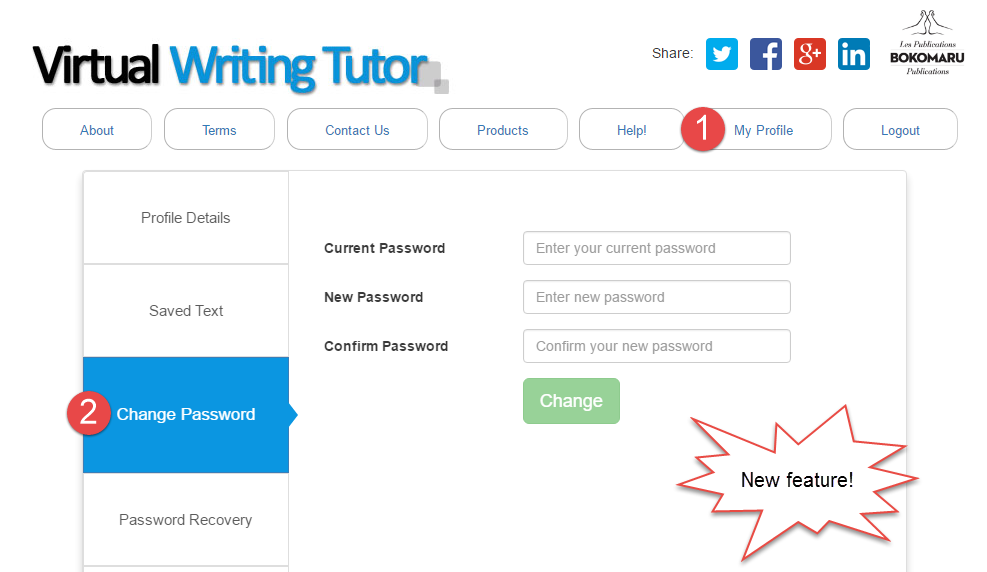
You can easily change your password for your VirtualWritingTutor.com account. Click on the "Change Password" tab and enter your new password twice and your old password once. 

Recover Your Password

If you have forgotten your password, you can now have a copy of your password sent to your email address. Since only you can access your email inbox, only you can recover it. 

Subscribe or Unsubscribe to Our Newsletter

We don't want to pester your with emails you don't want, so you can unsubscribe from our newsletter mailing list anytime and subscribe again just as easily.


TOP SECRET GAME

We have a cool new way to improve your revision skills. It is coming soon to your "My Profile" page. Stay tuned. 

Report Bad Feedback and False Alarms with a Single Click

Nobody likes to see bad feedback or false alarms while using the Virtual Writing Tutor. These little annoyances waste our time and mental energy.

That's why I put a lot of energy into reducing the number of false alarm messages the VWT generates. I do my very best to make sure you get only useful feedback. I'm making progress, but I can't imagine all of the sentences that users might write, so I can't eliminate all of these problems on my own.

I need your help!

That's why I added a "Report" button next to every feedback message the system generates. 


If you receive bad feedback or a false alarm, click it! Here's what happens next for members. An alert will show asking you to confirm your decision to report the problem. Click OK. 


The system will let you know if your report was successfully submitted for review. 

Then, the report is stored in my Administration Panel so that I can review reports and make the changes necessary to eliminate the false alarm or fix the feedback.

I can then delete old reports and update the system so that you do not see that problem again. 

Please use the "Report" button as often as you feel it is necessary. It is a big help to me, and you help all of the other users of the VirtualWritingTutor.com by improving the feedback that everyone gets on their texts.


Monday, August 15, 2016

The Blogging Cookbook for College ESL Teachers

Download your copy of The Blogging Cookbook for College ESL Teachers by Nicholas Walker and Helen Hefter.

Learn HTML while Blogging

The Blogging Cookbook for College ESL Teachers is intended to be self-explanatory. By following the directions, you will be able to create a web-log website (blog) that could prove useful and profitable to you. The examples are all relevant to ESL/EFL and will generate traffic, which will attract readers, advertisers and revenue to your blog. The principle goal of this cookbook, however, is to provide you with the confidence and momentum you’ll need to continue blogging and learning HTML, a basic web-programming language used extensively on the internet.


In this book, you will find the steps to follow to produce a 13-post blog of your own. The first three sections will simply introduce you to a free blogging platform called Blogger.com. Blogger is a Google property. It is free and easy to use. After a year of blogging, Blogger will offer to integrate AdSense advertisements into your blog, which will allow you to start making money from ads. (Remember that ads pay for content, so if you see an ad that interests you on someone else’s blog, click it. It will send the blog writer a small commission.) College students are usually chronically hard-up, so the fact that blogs can generate income is something worth mentioning to students. The next section is merely an illustration of the common HTML tags. The remaining sections will provide you with a number of adaptable mini-projects to include in your blog. Finally, the last section lists some resources that will help you learn more about HTML and blogging with students. 

All of the mini-projects in this cookbook use HTML rather than the what-you-see-is-what-you-get (WYSIWYG) compose-mode of Blogger. The reason for this choice is to provide you with HTML resources that you can use elsewhere, like Wordpress, Moodle, email, or any website that allows you to use HTML code. Also, I have found that simply by looking at HTML code you can learn a fair bit of HTML programming without having to take a course or rely on programmers. Basic HTML is pretty obvious: <b> means bold, <i> means italics, <strike> means strikethrough, <br> means break, etc. Take the time to look at the tags. You will get the hang of it very quickly.

Yours to Share and Adapt in Accordance with Sharealike 2.5

Remember that you are free to share the code, text, and images in this Blogging Cookbook for College ESL Teachers with your students and colleagues. You are also free to reuse and adapt any part of this document provided that you credit us, the original authors, Nicholas Walker and Helen Hefter. We also ask (but cannot insist) that you retain the links in the various mini-projects to our websites: VirtualWritingTutor.com, FieldRelated.com, BokomaruPublications.com, and Actively-Engaged-Online.blogspot.com. These links send a weak signal to Google and Bing to rank our websites a little higher in their search results. That helps us get our message out about our projects.

You can add your name as co-author to your adapted or expanded version of this document and even charge money for it, but you must retain the Sharealike 2.5 license on derivations. For example, you may want to add instructions for creating an account on Wordpress.com or Tumblr.com. Please do. Just add your name under our names on the first page. Remember that you can change the cookbook and pass it on, but you cannot prevent others from further adapting and expanding this document, too. Sound fair?

In any case, we hope you find The Blogging Cookbook for College ESL Teachers useful to you and your students.

Nicholas Walker and Helen Hefter
August 15, 2016

Pronunciation Checker


Use this speech recognition-enabled pronunciation checker to see if your pronunciation is comprehensible. If you are having difficulty being understood, type what you want to say into a text-to-speech pronunciation helper to get a clear model of the correct pronunciation of a word or phrase.

The Virtual Writing Tutor is the best online grammar checker for ESL learners.
Find out how you can add digital literacy training to your CEGEP ESL course with a textbook from Bokomaru Publications.
Pronounce English well

Thursday, August 11, 2016

Free ESL Grammar Checker


The Virtual Writing Tutor is the best online grammar checker for ESL learners.
Find out how you can add digital literacy training to your CEGEP ESL course with Bokomaru Publications.

MP3 Voice Recorder


Powered by Vocaroo Voice Recorder

Friday, May 20, 2016

Random Error Checker


The Virtual Writing Tutor is the best online grammar checkerfor ESL learners.
Add this random ESL error generator and checker to your blog or Moodle with this iframe HTML code.

Wednesday, December 30, 2015

Hypertext Narrative Walkthroughs by Program

Introduction

Hypertext narratives are fun to read. They invite the reader to make choices at key moments in the story that affect its direction and change the outcome for the protagonist. For the reader, this added interactivity gives the story a game-like feel that makes you want to read it again to see what would have happened if you had chosen a different path. For the author, the hypertext narrative unleashes new avenues of creativity and hypothesis-testing in the narrative mode. It situates thinking in the context of a life, and asks the all important question, "What if..?"

Hypertext Narratives for ESL

In language learning, the hypertext narrative holds a special promise. Not only does it afford interesting opportunities for learners to develop their digital literacy skills, skills that will prove more and more valuable as technology elbows its way into every field and profession. The hypertext narrative also situates meaningful language use. If language is best learned through the exchange of meaningful messages in a meaningful context--because situated, meaningful language practice facilitates the recall of target structures when those situations are encountered again in real life--the hypertext narrative provides an effective way for learners to visit a range of situations using their imaginations that would be difficult otherwise to simulate in the classroom. 

Talking about these hypertext narrative projects by asking and answering questions helps the learners link what they have written with speaking, and it gives learners practice talking about their work, a skill worth developing in future job interview and academic contexts. Recording the talk as a YouTube video is has become a popular and authentic way of communicating with the world beyond the walls of the classroom these days. Indeed, video recording a message affords additional opportunities to reflect on aspects of one's own performance and try again in ways that face-to-face interaction does not provide nearly so well. Since the learner has a choice to turn the camera on herself or on the screen, self-conscious students can focus as much or as little as they wish on how they look to others. 

For teachers concerned that learners should develop their moral and ethical thinking, what better way than to invite students to use their imaginations and visit the various consequences of a range of life choices and their alternatives to see how they might play out? Consider how a pedagogical essay asks the learner to take a position and defend it, or a debate explores the "for" and "against" of moral choice. A hypertext narrative goes further by inviting the author to consider the chain-reactions caused by choices and how so quickly we can be swept away by their consequences. 

About these Hypertext Narrative Walkthroughs

Whatever their pedagogical value, my students enjoyed flexing their creative muscles by thinking up moral challenges for their protagonists. See for yourself. Here is a gang of new hypertext authors talking about their hypertext narratives. You will have to listen carefully for the URL if you want to visit their blogs and read their hypertext narratives for yourself. 

I have arranged the various walkthroughs by program and field of study. You can search for a particular field-of-study using Ctrl + F on your keyboard, or you can scroll down alphabetically. The ones that deserve special attention are marked with an asterisk. Find them quickly by typing Ctrl + F and *.  

Please, leave a comment at the bottom of this page to share your thoughts on this new form of college-level writing. I can attest that it worked for me. If you want to try it with your students, leave a comment or order an evaluation copy of Actively Engaged at Online from Bokomaru Publications.

College Programs and Fields of Study

Accounting and Management Technology


Health Sciences

Medical Electrophysiology

Medical Records Technology


Police Technology

Social Science

Commerce

Education


Sport Studies


Paralegal Technology

Psychology


Friday, December 11, 2015

How to Create a Blog on Blogger: Getting Started

How to Create a Blog on Blogger

Step 1

The first step to creating your own blog for language learning is to go to Blogger.com. You will need to create an account if you don't have a Gmail account already. It is easy and takes seconds. 

Step 2

The next step is a little more complicated. You will need to create a title and address for your blog. The title should be related to your field of study or the thing that you expect to be writing about most. If you are not sure what topic you want to blog about, consider creating a title and address related to your name. If your name is "Helen," name your blog Helen's Blog (title) at helens-blog.blogspot.com (address). You will also have to choose a template. Choose something simple because this part is easy to change later. 

Step 3

Once you have created your blog title and address, click "New post" under the word "My blogs" on the left. If your blog is in another language you can change the language setting here by clicking the "cog" icon in the top right.


Step 4

When you click "New post" you will see a blank page. Give your blog post a title, like "About Me" and write something about who you are and what you do.  Click "Save" and "Publish" on the right and click "View blog" on the left. Now, you are a blogger. 

Step 5

You can leave your first blog post as it is, but serious writers look for feedback on their writing. Copy your first blog post and paste it into the VirtualWritingTutor.com and click "Check grammar" to see if it can detect any errors. If there are errors in your text, the VirtualWritingTutor will show you how to correct them.   


Step 6

Simply edit your post, make the necessary corrections, and click "Update." Now, you are ready to promote your blog. Why not join us a https://www.facebook.com/groups/learn.English.by.blogging and share your first blog post. The other members of this group would love to meet you and help you improve your writing. 


Sunday, December 6, 2015

Facebook Group to Learn English by Blogging

Nicholas Walker
So, you want to learn English.  That's great! Maybe, you want to improve ability to communicate in your field, or maybe you want to improve your chances of finding a job. I want to help you.

My name is Nicholas Walker. I teach college English as a Second Language in Montreal, Canada, and I develop websites related to ESL in my spare time. Not only do I have many years of experience teaching English in South Korea and Canada, I also have an M.A. in Applied Linguistics and a B.A. in English Literature. I know English, and I know how to teach it.

I want to help you improve your English, but you have to help me.

Here's how:

1. Be active. 

I want to work with people who are serious about improving their English. You can demonstrate that you are serious about learning English in the following ways.
  • Join my Facebook group: Learn English by Blogging. This is where we exchange links and advice to help each other. Promote your blog to other group members here.
  • Visit the group page every week, liking and responding to the activity there.
  • Arrange for video and audio chat conversations with other group members. 
  • Do the exercises and blog writing assignments. Don't stop.  
  • Create a blog on Blogger.com related to your field of study or passion. Make sure that your blog address and title contain words related to your field of study or interest. 

2. Help the other group members. 

There are a number of ways that you can be helpful to the other members of the  Learn English by Blogging Facebook group. Some ways are easy. Some take an extra effort. 
  • Easy: start by being supportive. Everyone likes to hear encouraging remarks about their efforts to learn and express themselves. Click the like button when someone shares a link to a blog post they have written. 
  • More difficult: write helpful comments. If you see a problem with someone's blog post, write a three part comment. 1) Thank that person for sharing. Say, "Thanks for sharing your blog post." 2) Tell the group member how to improve his or her blogpost with specific advice. For example, you could say, "You should write shorter paragraphs." 3) End with a specific positive comment, "I really like your title. Very catchy." Comments like these help writers feel good about the help they receive from others. 

3. Help the teacher.

You want to learn English. I want to promote my websites. In return for the opportunity to improve your English, I would like your help. Copy and paste the following links into your blog posts:

References

4. Write blog posts

Create a blog on Blogger, and start writing blog posts with titles, images, text, and links. Here are some blog post writing assignments I recommend:
  1. Introduction: write a paragraph about yourself and a paragraph about your professional goals for your blog. Explain why you are writing a blog and how you think it will help you.
  2. Listicle: write a numbered list of items related to a theme. Click here to see an example of a listicle. Make sure to include an introductory paragraph (no heading) and 3 or more paragraphs with numbered headings.
  3. Walkthrough: record yourself on YouTube giving a guided tour of a website related to your field of study or passion. Show your listener how to achieve a specific goal.  Embed your video on your blog with a short introductory paragraph. 
  4. Summary: write a summary of an article related to your field of study or passion. Do not copy and paste. Say why you chose the article and how it relates to your field. Add a link to the original article. 
  5. Glossary: Make a list of some technical or semi-technical terms related to your field of study or passion. Go to FieldRelated.com for examples. Do not copy paste a glossary entries. Make your own. Use Google and do a search using the the search term define + the word you wish to define. 
Once you have written each of these blog posts, share your link on the  Learn English by Blogging Facebook group. We will give you the encouragement and support you need to keep learning. 

Wednesday, September 2, 2015

Five Content Marketing Strategies for ESL Students

Actively Engaged Online book icon showing the cover and spiral binding
Digital literacy for ESL 

There is a new way to market products to consumers and get the attention of potential employers. It is called content marketing. The way it works is this: you publish articles (content) on a blog, and people looking for information using a search engine will find you and learn to like, trust and respect you (marketing) through your writing. Specifically, you’ll need to publish articles that show off your expertise on a particular niche topic or in a particular field of study. By drawing people to you who find that content useful and interesting, you demonstrate that you are both a knowledgeable and effective communicator. In the process, you will develop a relationship of trust and respect, which becomes the foundation for a sale or job offer.

Some companies and small businesses buy content from professional writers, but you are better off writing content for yourself. No only will you improve your understanding of the topics you write about, you will improve your digital literacy skills and your ability to communicate ideas in your field clearly and coherently. But what should you write about? Here are 5 easy blog post ideas to get you started.

1. The Listicle

Make a list of the top 3, top 5 or top 10 products or reasons for action in your field. Put the list in order from best to worst or worst to best. Make each item a numbered heading, and write one or more paragraph that explains why the item is on your list. Give your listicle (list + article = listicle) a title along the lines of 10 things every person needs, or 5 reasons to do X, and publish it on your blog. Google will find you and then anybody looking for information on that topic will as well.

2. Create a walkthrough of a useful website

The second most popular search engine on the internet today is the YouTube video search engine. Apart from music videos and funny home movies, people also search YouTube for information about websites and software. For example, before creating an account on a particular website or laying down money for software, many people search Youtube for a walkthrough. Video-walkthroughs are short videos where experienced users explain how to do a particular task with a website or program by speaking while doing the task. Video capture software like CamStudio or Camtasia Studio records the action on the screen and the expert’s voice. Since viewers are primarily after information, they do not expect perfect video production or superb voiceover talent. For bloggers, this suggests an easy way to create popular content that people will watch and share. Simply, visit a website of interest, record yourself talking about how to do something specific with the website, upload it to YouTube and use the embed code on the “share” tab to embed your video walkthrough into a blog post. To make sure Google finds your blog post, write a well-structured summary of what you said above the video. Search engines will use the keywords in your blog post URL, title, headings, text and image alt-tags text to determine what a webpage is about and send people to your website.

3. Article Summary

Here is a common journalism trick that young reporters learn early on. Find a news story or an article that will interest your customers, summarize and rewrite it in your own words. Paraphrase all quotes in the article and then add a new angle or development in the field that was not in the original article. Do not copy and paste. Your article must be completely reworded. If you plagiarize, you will be caught and you will earn the reputation of being a cheater and a fake. Not good. If your source writes, “Artificial intelligence is revolutionizing the legal sector and threatening to replace paralegals with data-mining algorithms,” you can write, “Robots are beginning to compete with paralegals for jobs at law firms.” Remember, blogs are conversational and informative. If you reword and summarize the original text with a more conversational tone, your readers will prefer it to the original. Be sure to link to the original article and give credit where credit is due.

4. Create a glossary

Make a list of the 10-20 technical terms or semi-technical terms that people in your industry use. Use the name of your field of study or English program name in the title of your glossary blog post like, “Police Technology Glossary” or “Glossary of Terms for Medical Imaging.” Do a Google search using the word “define” + the word you want defined. Then switch to the HTML mode of your blogging platform and define your vocabulary list using the web standard. Google and other search engines will put your glossary high up in the search results if your posts are standard compliant. Use <dl> and </dl> to contain your definition list. Use <dt> and </dt> to contain each term, and use  <dd> and </dd> to contain the definition of the preceding term.


5. Hypertext narratives

Set yourself apart from other blog writers by including a short hypertext narrative among your blog posts. Most blogs are non-fiction, so a hypertext narrative will bring fiction readers to your blog and give non-fiction readers an unexpected treat. Use hypertext narrative authoring tools like Twinery.org or adapt an existing HTML template. Whichever you choose, make it specific to your niche market. The novelty of hypertext fiction will get the attention of readers. The length and keyword density of your text will get the attention of the Google search engine.

Conclusion

These five types of blog posts are highly effective ways to market yourself as an expert in your field or niche market, but writing them is only half the battle. To ensure search engines find you and put you high up on the first page of their search results, you will have to do two things. The first is to use and reuse keywords specific to your field. If your goal is to market yourself as paramedic, make sure to use the words “Pre-hospital Emergency Care” and “paramedic” in your text, headings, image captions, tags and titles. This will improve your visibility to search engines. But just because you are visible does not mean you are valuable. The second things to do is to link to high quality websites and ask fellow bloggers to link to you. The quality and number of outbound and inbound links will help to push your content to the top of the list when people google you.


Checked and revised with the help of the Virtual Writing Tutor grammar checker

Monday, August 31, 2015

The Science of Absenteeism

by Nicholas Walker
Empty ChairThere are plenty of good reasons to skip class: if you have a contagious disease or have a doctor’s appointment that you cannot reschedule, if car trouble or bad weather interferes with your commute, or if you are flat broke and need to work an extra shift to make rent and avoid eviction. Most people would understand if you had to miss a lesson under these circumstances.

Surprisingly, these are not the reasons most university students give for cutting class. Students at one university rated low-quality lectures as the most important reason, followed by deadlines for other academic work, the lecturer’s inability to entertain, a lack of sleep, and attendance being unnecessary due to the availability of lecture notes outside of class (Clay & Breslow, 2006). These are the reasons students will admit to. But what about hidden reasons?

Read more...


Actively Engaged Online book icon showing the cover and spiral binding

Sunday, June 28, 2015

5 Great Reasons ESL Students Should Start a Blog

Actively Engaged Online book icon showing the cover and spiral binding
Digital literacy for ESL 
There are over 150 million blogs on the internet today. Why so many? People read blogs and rely on them for information. Reading blogs is great, but why should ESL students start blogs? It is a good question. Here are 5 great reasons for ESL students to create a blog in English.

1.  Improve your English

Blogs are a great way to communicate with people around the world about topics that interest you. Since languages are learned through the exchange of meaningful messages, blogging in English becomes a great way for you to master your English language skills while indulging your interest in your favorite topics.

Of course, you can learn about the properties of English by doing exercises and practice activities, but for grammar and vocabulary to really stick in your head, it is essential for those linguistic forms to be linked to meaning in your brain. Blogging in English is a very meaningful way to practice a language. Not only will you find yourself reading other blogs and watching YouTube videos in English for inspiration,  you will also want to make an extra effort that you are expressing yourself correctly and in a way people will understand. A number of useful tools are available to help you. 
  1. You can use Chrome or Chrome Portable to help you with your pronunciation. If you don't know how to pronounce something, your browser can model how to pronounce words and phrases for you. You can also check your pronunciation is to see if is clear enough for some else to understand you by using Chrome's speech recognition system. Very cool.
  2. If you want to check your English for common grammar errors, punctuation problems, and capitalization mistakes, use the Virtual Writing Tutor. The Virtual Writing Tutor, by Bokomaru Publications, is a free online grammar checker designed especially for ESL students. 
  3. You can check your word choice on FieldRelated.com to identify conversational and academic vocabulary, as well as field-related vocabulary.
  4. There is Google Translate which works like a bilingual dictionary but with speech recognition and speech synthesis.
  5.  For video blogging, or vlogging, there is CamtasiaStudio and its free counterpart Camstudio and its portable version. Creating video tutorials, uploading them to YouTube and embedding them on your blog will give you an opportunity to practice your English speaking skills online. 

2.  Become an expert that people know and trust

When people have a question about something, they usually go to the internet to do a search. If you use the keywords they use in their search in your blog post, their search engine will include you in the search results. Once people begin to find you and read your blog, it will help to establish you as an expert in your field of study. People will come to recognize that you are a valuable source of information. 

You can't become a valuable source of information unless you have information to share. This means developing your expertise by exploring recent research and technological innovations in your field and presenting it in a way that people will appreciate. Search engines and Wikipedia will help you track down new research that expand or refine our understanding of topics related to your field. Following up on new products released by leading companies in your field is another great way to develop your expertise and communication skills in your field. As you learn more about your field and explain it to people in a way that people appreciate, they will begin to recognize you as an expert that they can trust.  

3.  Make money

When it comes time to search for a job or start a business, your blog will show prospective employers and customers what you know and what you can do for them.When people know you, trust you, and like you, they are more likely to buy from you. Affiliate links, ads and online stores will then become significant sources of income that can make money for you while you sleep.

Think about it. If people read your articles and watch your video tutorials, they will come to respect you. Since the information you provide is free, they will certainly appreciate what you have done for them. That sets up the norm of reciprocity. You have done something nice for them and they will want to do something nice for you. When you recommend a product and provide a link, they may take the extra few seconds to find out about that product. If they are curious, they are more likely to indulge that curiosity by clicking on ads in your blog post. If they are ready to buy, they will prefer to buy from you than a stranger, and pow! You have made ad-revenue, or a commission on a sale, or sold  your services. That's digital marketing in a nutshell. It takes time, but it works.   

4.  Join a virtual community that spans the globe

Perhaps money is not your thing. People who obsess about money are boring anyway. Interesting people know stuff, make stuff and connect with other interesting people who know stuff, make stuff and connect with interesting people. You will find that your blog will bring you into contact with faraway people who share your interests and have skills that complement your own. 

You will see that there are people who are more skilled and knowledgeable than you and and others who can learn and benefit from knowing you. Eventually, you will discover that you are in the center of a worldwide network of nerdy-cool people. Bloggers belong to a community that stretches beyond their family and gang of neighbourhood friends, a virtual community that stretches over the internet and out into the wider world. While your buddies are talking hockey or politics or fashion, you will look up to see an airplane flying overhead and realize, "Hey, I know a guy in Kuala Lumpur. If I got on a plane, I could go there and shake his hand. Cool." 

5.  Develop your digital literacy skills

When you blog, you use the internet on a deeper level than most young people do. Most college students go on Facebook to flirt or joke around. They use only the buttons and tools that Facebook provides them. With a blog, you can switch from "Compose" mode to "HTML" mode and gain insight into how websites are made. 


As you gain confidence, you will want to embed media, links and buttons that add interactivity to your blog post. By switching to HTML mode, you see elements of the code that you can tweak and fiddle with. That is the beginning of web programming, a first step into a technology that is transforming the world before our eyes. You may start to wonder about Javascript, PHP MySQL, and Linux. Blogs will open your eyes to how the internet works, and you will go from being a consumer of digital content to a producer. Your blog will teach you how to read and write code. It will make you powerful. 

Even if you never switch to HTML mode, blogging will introduce you to concepts of hyperlinking, labels, URLS, alt tags, keywords and search engine optimization. These are important elements of a successful blog because of their influence on the way search engines find you and send traffic to your blog. Knowing how a search engine ranks one page above another will help you understand how machine determine the reliability of sources of information. 

These are 5 important reasons for college ESL students to start a blog. What are your reasons? Why not start your blog with a listicle explaining your reasons? 
I checked this blog post for common grammar, punctuation and spelling errors using a free online ESL grammar checker.

Thursday, June 25, 2015

How do you pronounce this?

Are you unsure how to pronounce a word?
Use your browser's speech synthesis system to pronounce any word or phrase you type into the input box below.


Adapted code based on Jason Mayes' example here: http://codepen.io/anon/pen/xGXZaW
I checked this blog post for common grammar, punctuation and spelling errors using a free online ESL grammar checker.
Actively Engaged Online book icon showing the cover and spiral binding

Friday, June 19, 2015

Create Your Own Desktop Pronunciation App

Have ever wondered how to pronounce a word but have been unsure who to ask? Now you can ask your Windows desktop or laptop to model a word's pronunciation for you. Here are the mouseless steps to follow.

Why do it mouslessly? A computer mouse is a very convenient tool, but it is not as quick as the keyboard. You can be twice as fast as the average computer user at work if you learn these shortcuts, making you twice as productive. In other words, you will deserve twice the salary of the guy sitting next to you when it comes time to negotiate a pay raise from your boss.

Step 1: Create a new text document with notepad

Press Windows + d to go to your desktop.


Press Ctrl + Spacebar to deselect any previously selected icons.


Press the menu key to open a context menu (the same as a right-click).


Use the arrow keys to navigate to "New," right arrow over to the second menu, and down-arrow to "Text Document."

Step 2: Copy/paste the code and rename the file

Name your new text document "Pronounce" and press enter. Press the menu key again and select "Edit" to open it for editing.

Navigate to your browser window using Alt + Tab.


Navigate within the window using the Tab key.


Keep pressing it until your cursor appears in the text area below.


Select all (Ctrl + A) the code in the text area above as shown below.


When you select all, the text will be highlighted in blue.


Copy (Ctrl +C) to copy the code. Navigate to your open text document window using Alt + Tab.and then paste (Ctrl + V) the copied code into the blank text document.


This is what it should look like.


Press the Alt key to access the menu bar. Press the down arrow to "Save As" and press "Enter."


On some keyboards, the "Enter" key is called "Return" or simply has an arrow with a right angle. In any case, it is just above the right hand "Shift" key. 


Save the text document as "Pronounce.vbs" Navigate to the desktop to see how it looks.


The file will look like this after you have saved it with its new name on the desktop.


Step 3: Test your new pronunciation app

Make sure that your speakers are on, open the application, and type in a word you want to hear pronounced.


Hit "Enter" and listen to the speech synthesis pronounce the word for you.

Step 4: Be proud of yourself

Not only have you created an application, you did it without a mouse--a true sign of computer proficiency. If English is not your first language, you should be extra-proud of yourself because you followed a complex procedure to its end producing a concrete result--a true sign of reading comprehension and second language competence.

What this exercise demonstrates is that skill with a computer is largely the result of reading and following written instructions. People who cannot or do not read instructions carefully will not succeed with this task.
I checked this blog post for common grammar, punctuation and spelling errors using a free online ESL grammar checker.