Showing posts with label Computer Assisted Language Learning. Show all posts

Monday, April 17, 2017

3 Free Online Grammar Checkers

Online grammar checkers are useful when you don't have a teacher on hand to proofread your writing for you. In some ways, an online grammar checker is even better than a teacher because it can tell you how to correct your mistakes in just a couple of seconds. Teachers take much longer to provide corrections. In business and the working world, emails have to be sent fast but they also have to be error-free.
Draft of the Declaration of Independence with corrections (1776)
Grammar checkers are also much cheaper than hiring a professional editor. A variety of online grammar checkers are free or inexpensive to use with a yearly subscription. To save you the trouble of searching and trying every grammar checker that Google suggests, here is my list of the some of the best free grammar checkers I have found online.

I also tested each of them with a random collection of sentences to see how well they would perform with English as a Second Language errors. Remember that language is very complex, so the performance of a grammar checker based on a single test should not deter you from trying each of these grammar checkers for yourself. Also, remember that grammar checking technology is improving day-to-day. What seems imperfect today is just a snapshot of an evolving technology that is bound to improve with time.

Here are the sentences I used for my test:

James Bond's Hospital offer health service for everyone in the whole world. I went a short trip to Busan before the new semester starts. The main difference between EMTs and Paramedic is the level of training. It's a lot of Anglophone who don't speak French. I'm that person who loves to work hard.

1. VirtualWritingTutor.com

The Virtual Writing Tutor online grammar checker is free to use. You can check short texts (500 words) for grammar, spelling, and other errors without becoming a member. With an account, you can check up to 3000 words at a time for free. Membership is necessary to save your texts and track your progress in the error correction game. You don't have to subscribe to the newsletter if you don't want to, but you will miss out on free stuff and other interesting offers if you don't subscribe.

Using the test sentences, the VirtualWritingTutor.com grammar checker performed very well. It caught 8 errors, with no false alarms or bad feedback. One drawback is that you have to scroll down to see the results of the grammar check. Some people might prefer to see the feedback closer to the textarea. However, this website is intended to "tutor" students, so it tries to make corrections memorable.    

2. GramCheck.com

GramCheck.com is another free grammar checker that you can find online. It is a little slower that the Virtual Writing Tutor and doesn't catch as many errors, but it has some very nice features. One big advantage is that it displays feedback next to the text being checked. It also has a corpus-based check that is slower still, but is supposed to provide a more thorough analysis. Unfortunately, it was not able to find and correct any more errors.


GramCheck.com grammar checker caught one mistake but did not provide the right correction. It is not correct to say "I went to a short trip." "Trip" and "voyage" usually take the preposition "on."

 3. SpellCheckPlus.com

SpellCheckPlus.com is also a free online grammar checker, but it has more advertisements than the first two, making it more confusing to use at first. It has one nice feature in that the first two don't have. It colour codes the errors it finds and shows the corrections in two ways: by hovering over the highlighted error, and by scrolling down to the bulleted list of corrections below. 


 Unfortunately, it performed the worst of the three on this particular test. It caught one error but misinterpreted it as a conjugation error instead of a number agreement error, providing bad feedback. It also flagged "Busan" as being potentially an incorrect spelling of "Pusan." It isn't. Koreans now regularly spell "Pusan" as "Busan." It is the new standard spelling. 


Thursday, March 9, 2017

New My Profile Features on the VWT

New Features

Check out the new features on VirtualWritingTutor.com. There are a bunch, and  we haven't stopped adding them yet.

Saved Texts

The most recent is a little hot link on the right hand side of the My Profile page, on the "Saved Text" tab. Whenever you use the Virtual Writing Tutor, it saves your text to your profile. That way you never lose a draft of what you were working on. If you want to delete a text for whatever reason, now you can.


Change Your Password

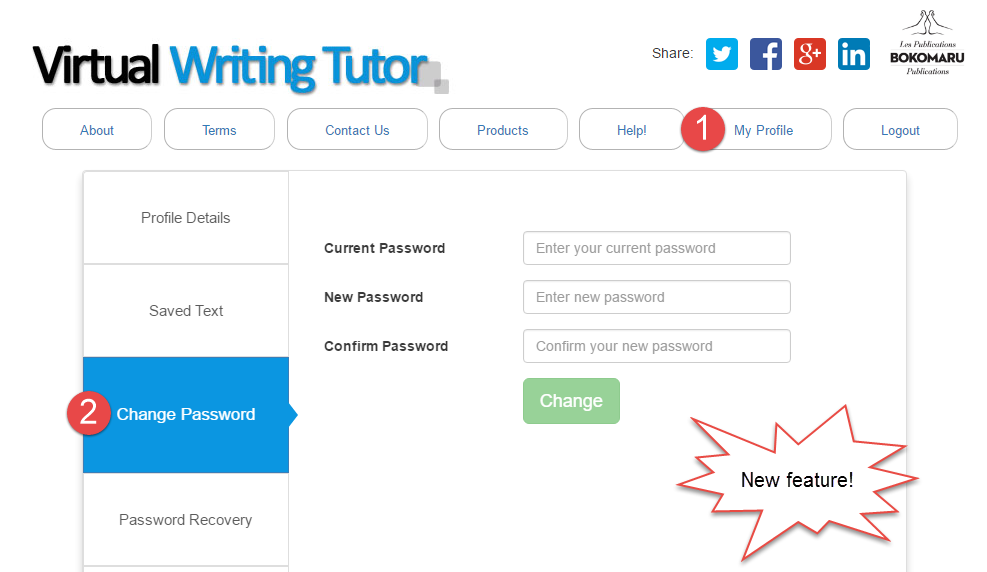
You can easily change your password for your VirtualWritingTutor.com account. Click on the "Change Password" tab and enter your new password twice and your old password once. 

Recover Your Password

If you have forgotten your password, you can now have a copy of your password sent to your email address. Since only you can access your email inbox, only you can recover it. 

Subscribe or Unsubscribe to Our Newsletter

We don't want to pester your with emails you don't want, so you can unsubscribe from our newsletter mailing list anytime and subscribe again just as easily.


TOP SECRET GAME

We have a cool new way to improve your revision skills. It is coming soon to your "My Profile" page. Stay tuned. 

Report Bad Feedback and False Alarms with a Single Click

Nobody likes to see bad feedback or false alarms while using the Virtual Writing Tutor. These little annoyances waste our time and mental energy.

That's why I put a lot of energy into reducing the number of false alarm messages the VWT generates. I do my very best to make sure you get only useful feedback. I'm making progress, but I can't imagine all of the sentences that users might write, so I can't eliminate all of these problems on my own.

I need your help!

That's why I added a "Report" button next to every feedback message the system generates. 


If you receive bad feedback or a false alarm, click it! Here's what happens next for members. An alert will show asking you to confirm your decision to report the problem. Click OK. 


The system will let you know if your report was successfully submitted for review. 

Then, the report is stored in my Administration Panel so that I can review reports and make the changes necessary to eliminate the false alarm or fix the feedback.

I can then delete old reports and update the system so that you do not see that problem again. 

Please use the "Report" button as often as you feel it is necessary. It is a big help to me, and you help all of the other users of the VirtualWritingTutor.com by improving the feedback that everyone gets on their texts.


Monday, August 15, 2016

The Blogging Cookbook for College ESL Teachers

Download your copy of The Blogging Cookbook for College ESL Teachers by Nicholas Walker and Helen Hefter.

Learn HTML while Blogging

The Blogging Cookbook for College ESL Teachers is intended to be self-explanatory. By following the directions, you will be able to create a web-log website (blog) that could prove useful and profitable to you. The examples are all relevant to ESL/EFL and will generate traffic, which will attract readers, advertisers and revenue to your blog. The principle goal of this cookbook, however, is to provide you with the confidence and momentum you’ll need to continue blogging and learning HTML, a basic web-programming language used extensively on the internet.


In this book, you will find the steps to follow to produce a 13-post blog of your own. The first three sections will simply introduce you to a free blogging platform called Blogger.com. Blogger is a Google property. It is free and easy to use. After a year of blogging, Blogger will offer to integrate AdSense advertisements into your blog, which will allow you to start making money from ads. (Remember that ads pay for content, so if you see an ad that interests you on someone else’s blog, click it. It will send the blog writer a small commission.) College students are usually chronically hard-up, so the fact that blogs can generate income is something worth mentioning to students. The next section is merely an illustration of the common HTML tags. The remaining sections will provide you with a number of adaptable mini-projects to include in your blog. Finally, the last section lists some resources that will help you learn more about HTML and blogging with students. 

All of the mini-projects in this cookbook use HTML rather than the what-you-see-is-what-you-get (WYSIWYG) compose-mode of Blogger. The reason for this choice is to provide you with HTML resources that you can use elsewhere, like Wordpress, Moodle, email, or any website that allows you to use HTML code. Also, I have found that simply by looking at HTML code you can learn a fair bit of HTML programming without having to take a course or rely on programmers. Basic HTML is pretty obvious: <b> means bold, <i> means italics, <strike> means strikethrough, <br> means break, etc. Take the time to look at the tags. You will get the hang of it very quickly.

Yours to Share and Adapt in Accordance with Sharealike 2.5

Remember that you are free to share the code, text, and images in this Blogging Cookbook for College ESL Teachers with your students and colleagues. You are also free to reuse and adapt any part of this document provided that you credit us, the original authors, Nicholas Walker and Helen Hefter. We also ask (but cannot insist) that you retain the links in the various mini-projects to our websites: VirtualWritingTutor.com, FieldRelated.com, BokomaruPublications.com, and Actively-Engaged-Online.blogspot.com. These links send a weak signal to Google and Bing to rank our websites a little higher in their search results. That helps us get our message out about our projects.

You can add your name as co-author to your adapted or expanded version of this document and even charge money for it, but you must retain the Sharealike 2.5 license on derivations. For example, you may want to add instructions for creating an account on Wordpress.com or Tumblr.com. Please do. Just add your name under our names on the first page. Remember that you can change the cookbook and pass it on, but you cannot prevent others from further adapting and expanding this document, too. Sound fair?

In any case, we hope you find The Blogging Cookbook for College ESL Teachers useful to you and your students.

Nicholas Walker and Helen Hefter
August 15, 2016

Pronunciation Checker


Use this speech recognition-enabled pronunciation checker to see if your pronunciation is comprehensible. If you are having difficulty being understood, type what you want to say into a text-to-speech pronunciation helper to get a clear model of the correct pronunciation of a word or phrase.

The Virtual Writing Tutor is the best online grammar checker for ESL learners.
Find out how you can add digital literacy training to your CEGEP ESL course with a textbook from Bokomaru Publications.
Pronounce English well

Friday, August 12, 2016

How to use your own web address for your blog

Instead of having a blog with a URL like Actively-Engaged-Online.Blogspot.com, imagine having your own domain name of your own invention with a .com or other extension. It is easy and affordable.


Change this: yourblog.Blogspot.com

To this: www.YourWebsite.com

Step 1: Navigate to Hover 

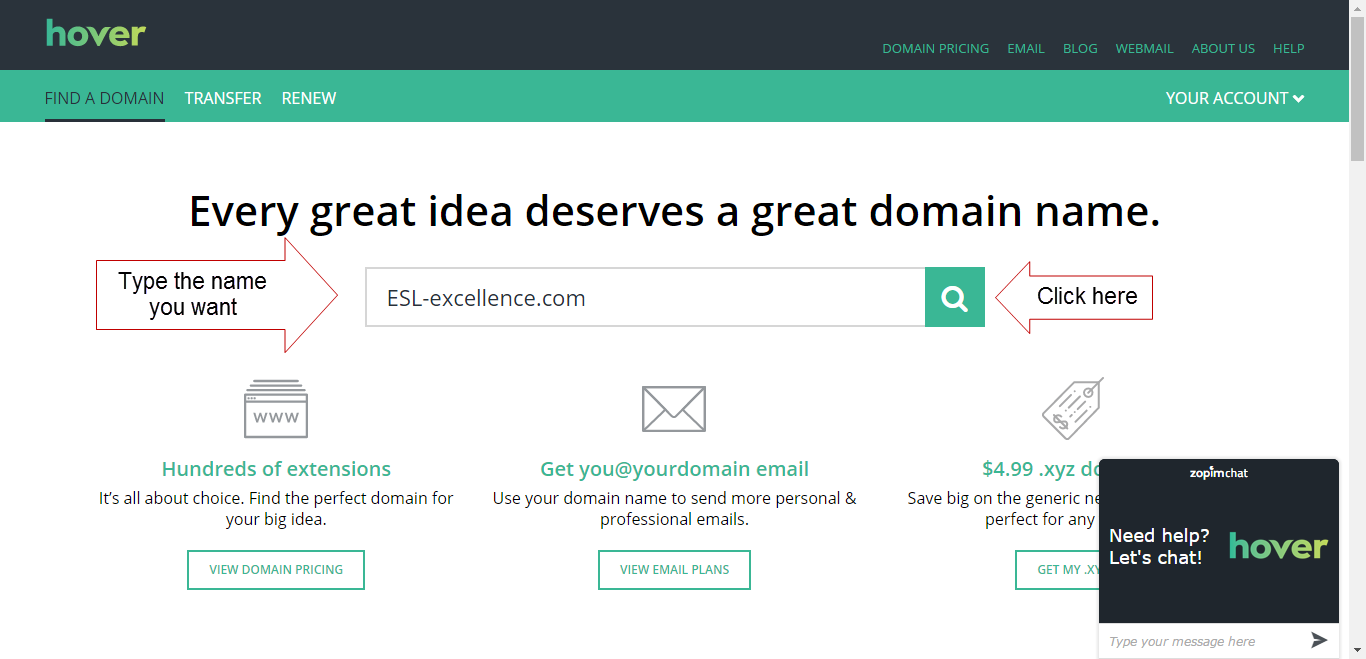
Hover is a domain registrar that can find and register domain names with a variety of extensions. 


 Step 2: Think of a Domain Name you would Like

Simply, type in a domain name you might like for yourself, and click search, like this. For example, I would like people to find my blog by typing in "www.ESL-excellence.com" so I typed in "ESL-excellence.com" and clicked the search icon.


Step 3: Register the Domain Name

I was lucky and the domain name I wanted was available. To buy it, all I have to do is click on the plus sign and pay.


Step 4: Link the Domain Name to Your Blog

After buying your domain name, the next step is to make it point to your Blogger blog. Navigate to your blogger account and click on your blog. Then, click on settings. 


Step 5: Navigate to Settings

After buying your domain name, the next step is to make it point to your Blogger blog. Navigate to your blogger account and click on your blog. Then, click on settings. 

Step 6: Enter Your New Domain Name

Now, simply enter your domain name into the field on Blogger, and click save.


Step 7: Enter Blogger's Details on Hover

Blogger will give you CNAME and other details associated with your blog. Copy the information exactly into the appropriate fields on Hover. Hover has people who can help you with this step if you get stuck. It's not as difficult as you might think. Once your info has been entered, your readers will be able to navigate to your blog using your www address.


Thursday, August 11, 2016

Free ESL Grammar Checker


The Virtual Writing Tutor is the best online grammar checker for ESL learners.
Find out how you can add digital literacy training to your CEGEP ESL course with Bokomaru Publications.

MP3 Voice Recorder


Powered by Vocaroo Voice Recorder

Vocabulary Checker for English for Professional Purposes


Find field-related texts here.
FieldRelated.com is an online vocabulary checker for English for Professional Purposes learners.

Friday, May 20, 2016

Random Error Checker


The Virtual Writing Tutor is the best online grammar checkerfor ESL learners.
Add this random ESL error generator and checker to your blog or Moodle with this iframe HTML code.

Sunday, January 24, 2016

51 Listicles by Field of Study

Listicles for College-Level ESL

The word "listicle" is a combination of the words "list" and "article." You have seen them before. They pop up all over the internet with titles like "5 Best" or "10 Top Reasons" or even "100 Ways to..." Each listicle is a blogpost organized around a prioritized list and is essentially a series of paragraphs where the heading declares both the topic of the paragraph and its rank in a prioritized list. As such, listicles attempt to persuade the reader to do something or accept an opinion based on a list of justifications.

Below is a list of listicles arranged by field of study. These blog posts were written by my students at Ahuntsic College in the context of their 101 B-block course in September, 2015. The goal of the assignment was to provide a number of reasons to choose a particular field of study. As their first writing assignment, they represent each student's first foray into blog writing.


The Listicle Assignment

As part of an effort to promote digital literacy, I required a number of features that are common to listicle blog posts. I asked that they add an image related to their field with the appropriate attribution, so I recommended that they search Wikimedia Commons, a repository of share-with-attribution and public domain images.  I also asked for headings, a minimum of 350+ words, and the elimination of all errors using an online ESL grammar checker. Though the grammar checker system did not catch all of their errors, my intention was to train them to use a revision strategy that would serve them in the future when they no longer had access to an ESL teacher to proofread their writing. Finally, to promote group cohesion and productivity, I gave a point for having received a comment on their blog post. To get the point, they had to find someone to read their articles.

The Listicle Evaluation

Evaluations were easy to do. Students did two anonymous peer evaluations of classmates' listicles after submitting a link to their own listicle using a Moodle plugin on Labodanglais.com. To ensure the reliability of the peer assessment, I used an illustrated checklist--the same checklist I used when I did my evaluation. I find that using binary assessment criteria ensures that the number of requests to explain scores and feedback is zero. See below for a screenshot of part of the checklist I used.


Reflection

Considering that so many of my students are not headed directly to university, the academic essay did not seem to be the best choice of writing assignment for this student population. The listicle, however, has qualities that can serve both academic and non-academic stream students. It is structured, persuasive, and requires paragraphing and revision strategies. In this way, it allowed the students to work toward the 101 b-block writing competency while exploring and reinforcing their own motivation for their choice of program.

More importantly, the task is authentic. This type of blog post is a common discourse model in the blogosphere. Learning to do it will help learners develop their own content marketing strategies that should serve them in business and further education.  The conversational tone of the listicle supports speaking fluency, making it a worthwhile writing task for a course with the stated goal of "a degree of fluency" since overemphasizing formal registers has been found to reduce integrativeness in second language learners.

There are other reasons why students should write blogs in their Cegep ESL courses, but if you are already convinced, there is a textbook for blogging in Cegep 101B or 102B that you can try.

Accounting and Management Technology

By Chisholm, Hugh, ed.
(Encyclopædia Britannica 1911)
[Public domain], via Wikimedia Commons
  1. Listicle
  2. Listicle
  3. Listicle
  4. Listicle
  5. Listicle
  6. Listicle
  7. Listicle
  8. Listicle
  9. Listicle
  10. Listicle

Business

Joe Mabel [GFDL 
(http://www.gnu.org/copyleft/fdl.html)
or CC-BY-SA-3.0
(http://creativecommons.org/
licenses/by-sa/3.0/)],
via Wikimedia Commons
    1. Listicle
    2. Listicle
    3. Listicle
    4. Listicle
    5. Listicle

    Communication

    Dental Hygiene


    Diagnostic Imaging

    By liz west from Boxborough, MA
    (CAT scan Uploaded by Jacopo Werther)
    [CC BY 2.0 (http://creativecommons.org/
    licenses/by/2.0)],
    via Wikimedia Commons
    1. Listicle
    2. Listicle
    3. Listicle
    4. Listicle

    Electrophysiology

    Finance

    Health Science

    Journalism

    Medical Records Management

    1. Listicle
    2. Listicle

    Paralegal Technology

    By Peregrine981
    (Own work) [Public domain], 
    via Wikimedia Commons
    1. Listicle
    2. Listicle
    3. Listicle

    Physical Education


    Police Technology

    By SPBer (Own work)
    [CC BY-SA 3.0
    (http://creativecommons.org/
    licenses/by-sa/3.0)],
    via Wikimedia Commons
    1. Listicle
    2. Listicle
    3. Listicle
    4. Listicle
    5. Listicle
    6. Listicle
    7. Listicle
    8. Listicle
    9. Listicle
    10. Listicle


    Prehospital Emergency Care

    By Mtlfiredude (Own work)
    [CC BY-SA 3.0
    (http://creativecommons.org/licenses/by-sa/3.0)],
    via Wikimedia Commons

    Psychology

    1. Listicle
    2. Listicle
    3. Listicle

    Radiation Oncology

    Social Science

    1. Listicle
    2. Listicle
    3. Listicle

    Video Game Design

    Youth and Correctional Intervention


      Wednesday, December 30, 2015

      Hypertext Narrative Walkthroughs by Program

      Introduction

      Hypertext narratives are fun to read. They invite the reader to make choices at key moments in the story that affect its direction and change the outcome for the protagonist. For the reader, this added interactivity gives the story a game-like feel that makes you want to read it again to see what would have happened if you had chosen a different path. For the author, the hypertext narrative unleashes new avenues of creativity and hypothesis-testing in the narrative mode. It situates thinking in the context of a life, and asks the all important question, "What if..?"

      Hypertext Narratives for ESL

      In language learning, the hypertext narrative holds a special promise. Not only does it afford interesting opportunities for learners to develop their digital literacy skills, skills that will prove more and more valuable as technology elbows its way into every field and profession. The hypertext narrative also situates meaningful language use. If language is best learned through the exchange of meaningful messages in a meaningful context--because situated, meaningful language practice facilitates the recall of target structures when those situations are encountered again in real life--the hypertext narrative provides an effective way for learners to visit a range of situations using their imaginations that would be difficult otherwise to simulate in the classroom. 

      Talking about these hypertext narrative projects by asking and answering questions helps the learners link what they have written with speaking, and it gives learners practice talking about their work, a skill worth developing in future job interview and academic contexts. Recording the talk as a YouTube video is has become a popular and authentic way of communicating with the world beyond the walls of the classroom these days. Indeed, video recording a message affords additional opportunities to reflect on aspects of one's own performance and try again in ways that face-to-face interaction does not provide nearly so well. Since the learner has a choice to turn the camera on herself or on the screen, self-conscious students can focus as much or as little as they wish on how they look to others. 

      For teachers concerned that learners should develop their moral and ethical thinking, what better way than to invite students to use their imaginations and visit the various consequences of a range of life choices and their alternatives to see how they might play out? Consider how a pedagogical essay asks the learner to take a position and defend it, or a debate explores the "for" and "against" of moral choice. A hypertext narrative goes further by inviting the author to consider the chain-reactions caused by choices and how so quickly we can be swept away by their consequences. 

      About these Hypertext Narrative Walkthroughs

      Whatever their pedagogical value, my students enjoyed flexing their creative muscles by thinking up moral challenges for their protagonists. See for yourself. Here is a gang of new hypertext authors talking about their hypertext narratives. You will have to listen carefully for the URL if you want to visit their blogs and read their hypertext narratives for yourself. 

      I have arranged the various walkthroughs by program and field of study. You can search for a particular field-of-study using Ctrl + F on your keyboard, or you can scroll down alphabetically. The ones that deserve special attention are marked with an asterisk. Find them quickly by typing Ctrl + F and *.  

      Please, leave a comment at the bottom of this page to share your thoughts on this new form of college-level writing. I can attest that it worked for me. If you want to try it with your students, leave a comment or order an evaluation copy of Actively Engaged at Online from Bokomaru Publications.

      College Programs and Fields of Study

      Accounting and Management Technology


      Health Sciences

      Medical Electrophysiology

      Medical Records Technology


      Police Technology

      Social Science

      Commerce

      Education


      Sport Studies


      Paralegal Technology

      Psychology


      Friday, December 11, 2015

      How to Create a Blog on Blogger: Getting Started

      How to Create a Blog on Blogger

      Step 1

      The first step to creating your own blog for language learning is to go to Blogger.com. You will need to create an account if you don't have a Gmail account already. It is easy and takes seconds. 

      Step 2

      The next step is a little more complicated. You will need to create a title and address for your blog. The title should be related to your field of study or the thing that you expect to be writing about most. If you are not sure what topic you want to blog about, consider creating a title and address related to your name. If your name is "Helen," name your blog Helen's Blog (title) at helens-blog.blogspot.com (address). You will also have to choose a template. Choose something simple because this part is easy to change later. 

      Step 3

      Once you have created your blog title and address, click "New post" under the word "My blogs" on the left. If your blog is in another language you can change the language setting here by clicking the "cog" icon in the top right.


      Step 4

      When you click "New post" you will see a blank page. Give your blog post a title, like "About Me" and write something about who you are and what you do.  Click "Save" and "Publish" on the right and click "View blog" on the left. Now, you are a blogger. 

      Step 5

      You can leave your first blog post as it is, but serious writers look for feedback on their writing. Copy your first blog post and paste it into the VirtualWritingTutor.com and click "Check grammar" to see if it can detect any errors. If there are errors in your text, the VirtualWritingTutor will show you how to correct them.   


      Step 6

      Simply edit your post, make the necessary corrections, and click "Update." Now, you are ready to promote your blog. Why not join us a https://www.facebook.com/groups/learn.English.by.blogging and share your first blog post. The other members of this group would love to meet you and help you improve your writing. 


      Sunday, December 6, 2015

      Facebook Group to Learn English by Blogging

      Nicholas Walker
      So, you want to learn English.  That's great! Maybe, you want to improve ability to communicate in your field, or maybe you want to improve your chances of finding a job. I want to help you.

      My name is Nicholas Walker. I teach college English as a Second Language in Montreal, Canada, and I develop websites related to ESL in my spare time. Not only do I have many years of experience teaching English in South Korea and Canada, I also have an M.A. in Applied Linguistics and a B.A. in English Literature. I know English, and I know how to teach it.

      I want to help you improve your English, but you have to help me.

      Here's how:

      1. Be active. 

      I want to work with people who are serious about improving their English. You can demonstrate that you are serious about learning English in the following ways.
      • Join my Facebook group: Learn English by Blogging. This is where we exchange links and advice to help each other. Promote your blog to other group members here.
      • Visit the group page every week, liking and responding to the activity there.
      • Arrange for video and audio chat conversations with other group members. 
      • Do the exercises and blog writing assignments. Don't stop.  
      • Create a blog on Blogger.com related to your field of study or passion. Make sure that your blog address and title contain words related to your field of study or interest. 

      2. Help the other group members. 

      There are a number of ways that you can be helpful to the other members of the  Learn English by Blogging Facebook group. Some ways are easy. Some take an extra effort. 
      • Easy: start by being supportive. Everyone likes to hear encouraging remarks about their efforts to learn and express themselves. Click the like button when someone shares a link to a blog post they have written. 
      • More difficult: write helpful comments. If you see a problem with someone's blog post, write a three part comment. 1) Thank that person for sharing. Say, "Thanks for sharing your blog post." 2) Tell the group member how to improve his or her blogpost with specific advice. For example, you could say, "You should write shorter paragraphs." 3) End with a specific positive comment, "I really like your title. Very catchy." Comments like these help writers feel good about the help they receive from others. 

      3. Help the teacher.

      You want to learn English. I want to promote my websites. In return for the opportunity to improve your English, I would like your help. Copy and paste the following links into your blog posts:

      References

      4. Write blog posts

      Create a blog on Blogger, and start writing blog posts with titles, images, text, and links. Here are some blog post writing assignments I recommend:
      1. Introduction: write a paragraph about yourself and a paragraph about your professional goals for your blog. Explain why you are writing a blog and how you think it will help you.
      2. Listicle: write a numbered list of items related to a theme. Click here to see an example of a listicle. Make sure to include an introductory paragraph (no heading) and 3 or more paragraphs with numbered headings.
      3. Walkthrough: record yourself on YouTube giving a guided tour of a website related to your field of study or passion. Show your listener how to achieve a specific goal.  Embed your video on your blog with a short introductory paragraph. 
      4. Summary: write a summary of an article related to your field of study or passion. Do not copy and paste. Say why you chose the article and how it relates to your field. Add a link to the original article. 
      5. Glossary: Make a list of some technical or semi-technical terms related to your field of study or passion. Go to FieldRelated.com for examples. Do not copy paste a glossary entries. Make your own. Use Google and do a search using the the search term define + the word you wish to define. 
      Once you have written each of these blog posts, share your link on the  Learn English by Blogging Facebook group. We will give you the encouragement and support you need to keep learning. 

      Tuesday, October 6, 2015

      Field of Study Glossaries as an Authentic Blog Post Type


      People often need to look up unfamiliar words, and so one common type of blog post that people search for is the field-related glossary. For college students, compiling a list of field-specific words can be a useful way to become more familiar with technical and semi-technical words in their fields of study. The field-specific glossary is therefore both an authentic and pedagogically useful writing model for college ESL students to learn. Each field of study comes with its own specialized vocabulary or with common vocabulary used in a specialized way. Consider how a "jab" in boxing a semi-technical name for "a short, straight punch," but in nursing a "jab" refers to "an injection with a needle."

      Glossaries usually come with a short explanatory paragraph and then employ <dl></dl> tags to contain the definition list, <dt></dt> tags to contain the term being defined, and <dd></dd> tags to contain the definition.  Below is the form a glossary blog post usually takes without any content. Make your own glossary with a title, short introduction, a heading and a list of words.

      Glossary Heading

      term 1
      definition 1
      term 2
      definition 2
      term 3
      definition 3
      term 4
      definition 4
      term 5
      definition 5
      term 6
      definition 6
      term 7
      definition 7
      term 8
      definition 8
      term 9
      definition 9
      term 10
      definition 10
      For more words related to this field or study, or to analyze any text for program-related or field-related vocabulary go to FieldRelated.com.

      Analyze your text for field-related vocabulary with FieldRelated.com